 OMGLoftClassic games. Real players.
How to play — Nonograms
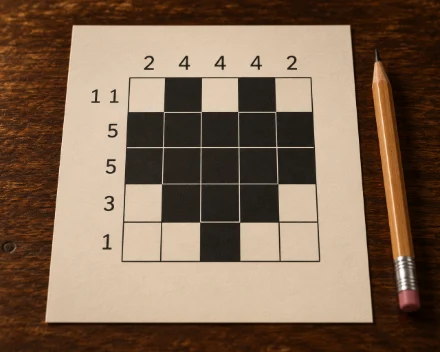
Nonograms online — a free single-player game in your browser, no sign-up or download needed.
Show less
Goal
Reveal a picture hidden in the grid. Numbers on the left describe consecutive groups of filled cells in a row; numbers above describe a column. For example, 3, 1 means three filled cells together, at least one empty cell, then one filled cell. Empty cells can also appear before and after the groups. Zero means an entirely empty line.
Levels
Easy: 5 × 5, Medium: 10 × 10, Hard: 15 × 15, Expert: 20 × 20. Each level uses five patterns with rotations and reflections. Every puzzle has one solution that can be found by comparing its row and column clues.
Filling and crosses
Select Fill, Crosses or Erase above the board, then click a cell. Applying the same mark again clears it. A cross is a note that a cell should stay empty. On a computer, drag across multiple cells to apply the same mark. The right mouse button places crosses.
Phone and keyboard
Tap to apply the selected tool. Hold briefly to add or remove a cross. Swipe to scroll a large board without painting. Clues stay along the edges. Arrow keys move the selection; Space or Enter applies the tool; X places a cross; Delete or Backspace clears the cell.
Help
Undo restores previous marks, including an entire drag. Hint corrects the selected cell; if it is already marked correctly, it helps elsewhere. Each hint adds 30 seconds. Undoing a hint does not remove that penalty. A changed clue colour means the filled groups match that line's numbers, but does not guarantee the whole picture is correct.
Completion and score
You finish automatically when exactly the right cells are filled. You do not need to cross out every empty cell. On completion, remaining cells receive crosses and the picture stays visible. Rankings compare completion time plus hint penalties, separately for each level. Leaving an unfinished game does not record a win.